AI Tools for the Remote Worker: Not the Hype. The Actual Daily Use Cases.
Everyone's talking about AI. Very few people are talking about how it actually fits into a real remote workday. Here are the specific, unglamorous, genuinely useful ways AI is saving developers and remote workers hours every week — no chatbot philosophy required.
I Didn't Want to Write an AI Post. Here's Why I Changed My Mind.
There are already too many AI posts.
You know the kind.
"AI will change everything."
"10 ChatGPT prompts to 10x your productivity."
"The future of work is here."
Most of them are written by people who tried a tool for a weekend and called it a transformation.
I resisted writing one for a long time because I didn't want to add to the noise.
Then I looked at my actual workday and noticed something uncomfortable.
AI had quietly become load-bearing infrastructure for how I work. Not in a dramatic way. Not in a "this replaced my entire workflow" way. In the same way a good text expander or keyboard shortcut becomes invisible — you only notice it when it's gone.
That's the version of this post I want to write.
Not the hype. Not the philosophy.
The specific, unglamorous, genuinely useful things — the ones that save 20 minutes here, prevent a context switch there, turn a dreaded task into a two-minute one.
If you're a remote tech worker with a healthy skepticism for AI evangelism, this one's for you.
The Rule I Applied to Every Tool on This List
Before anything made it into this post, it had to pass a simple test:
Does this save meaningful time or cognitive load on something I do at least three times a week?
Not "is this impressive."
Not "could this theoretically be useful."
Does it solve a recurring, real problem in a real workday — consistently?
Everything here passed that test.
The Actual Use Cases
1. The Standup Summary You Don't Want to Write
Daily standups require a brief written summary of what you did yesterday, what you're doing today, and whether anything is blocked.
It's a 90-second task.
It's also a task that, when you're in the middle of something, requires you to context-switch, reconstruct your previous day from memory, find the right tone, and write it up — all before you've gotten any real work done.
The AI version: Keep a running list of what you actually worked on as you go — commits, Jira tickets closed, PRs reviewed, anything. At standup time, paste the list into a prompt:
Here's what I worked on yesterday: [list]. Write a concise standup update in 3 bullet points —
yesterday, today's plan, and blockers. Keep it under 80 words, professional but casual.
Thirty seconds. Done.
This isn't about being lazy. It's about not burning cognitive load on formatting when that load is better spent on the work itself.
2. PR Descriptions That Actually Explain the Change
Every developer knows the PR description they write at 5 PM on a Friday after a long week.
"Fix bug."
"Updates."
"WIP — don't merge."
The PR description is important. It's the artifact that explains why a change was made, not just what changed. Future-you and your teammates will read it. Reviewers will reference it. It deserves more than two words.
But after a day of deep work, the last thing you want to do is write documentation.
The AI version: Paste your diff summary or a list of what changed and what problem it solves:
I fixed a race condition in the auth token refresh logic. The bug caused intermittent
401 errors on concurrent requests. Here's the change: [summary]. Write a clear PR
description with a problem statement, solution approach, and testing notes.
The output needs editing — it always does. But you're editing, not starting from scratch. That's a different cognitive task, and a much lighter one.
3. Meeting Notes Nobody Volunteered to Write
Remote meetings generate action items, decisions, and follow-ups that live and die in someone's hastily typed notes app.
If you're the one who volunteered to take notes — or got voluntold — you're spending half the meeting writing and half listening, and doing neither well.
The AI version: Record the meeting (with consent — tools like Otter.ai, Fireflies, or Zoom's built-in transcription handle this), then feed the transcript to an AI with a focused prompt:
Here's the transcript from a 45-minute product sync. Extract:
1) Key decisions made, 2) Action items with owners, 3) Open questions that need follow-up.
Format as a clean summary I can paste into Notion.
The transcript is messy. The output is structured and scannable. The whole thing takes three minutes instead of thirty.
4. The First Draft of Anything You're Dreading
There's a specific category of work task that produces disproportionate dread relative to how long it actually takes.
The difficult email.
The performance self-review.
The architecture decision record.
The post-incident report nobody wants to author.
The dread isn't usually about the writing. It's about starting. The blank page with stakes attached.
The AI version: Describe what you need in plain language, including the context and tone:
I need to write a post-incident report for a database outage last Thursday.
It lasted 2.5 hours, affected 3 enterprise customers, root cause was a misconfigured
connection pool after a deploy. We've added a pre-deploy checklist to prevent recurrence.
Audience is internal engineering leadership. Tone: direct, accountable, no defensiveness.
Draft the report structure and first pass.
You'll rewrite most of it. That's fine. You're no longer staring at a blank page — you're editing a draft. The psychological difference is enormous.
5. Explaining Technical Concepts to Non-Technical Stakeholders
This one comes up constantly.
A product manager asks why a migration will take three weeks. An executive wants to understand the security implications of a proposed architecture change. A client asks why the thing they requested isn't possible the way they described it.
The answer exists in your head.
Getting it out in language that lands with someone who doesn't share your mental model — without being condescending, without over-simplifying, without writing an essay — is genuinely hard.
The AI version:
Explain why database schema migrations on a live system with 50M+ rows can't just be
"run over the weekend." My audience is a non-technical product manager who understands
business risk but not infrastructure. Keep it under 150 words and use an analogy if it helps.
Then read it, correct anything technically imprecise, and send it. What would have taken 20 minutes of careful word-choice takes five.
6. Code Review Responses That Don't Start Flame Wars
Code review is collaboration. It doesn't always feel that way.
When you get a review comment that reads as dismissive, pedantic, or simply wrong — and you need to respond professionally — the gap between what you want to type and what you should type can be significant.
The AI version:
Someone left this code review comment on my PR: "[paste comment]"
My instinct is to push back because [reason]. Help me write a response that's direct
and technically grounded, but keeps the conversation collaborative. No passive aggression.
This isn't about suppressing your perspective. It's about delivering it in a way that moves the conversation forward instead of sideways.
7. Summarizing Documentation You Don't Have Time to Read
The library updated. The API changed. There's a new internal RFC you're supposed to have opinions on by Friday.
The documentation is 4,000 words and your afternoon is already gone.
The AI version: Paste the docs (or the relevant sections) with a focused prompt:
Summarize this API documentation. I need to know: what changed from v2 to v3,
what will break in my current implementation, and what I need to update first.
Format as a short briefing, not a full summary.
The key is the specific ask. "Summarize this" produces a long summary. "Tell me what I need to act on" produces something useful.
What AI Is Not Good At (In a Real Workday)
Honest assessment requires acknowledging the limits.
It's unreliable for anything requiring current or proprietary information. If the answer lives in your internal codebase, your company's specific context, or events after the model's training cutoff — verify everything.
It's a confidence machine, not an accuracy machine. AI will write a wrong answer with exactly the same tone as a right one. The more domain-specific the question, the more carefully you need to read the output.
It doesn't replace thinking — it accelerates the parts around thinking. The architectural decision, the technical judgment call, the creative problem-solving — that's still yours. What AI removes is the administrative overhead around those things: the formatting, the summarizing, the first-draft generation.
That's the actual value. Not intelligence replacement. Cognitive overhead reduction.
Recommended Tool: Blue Yeti USB Microphone
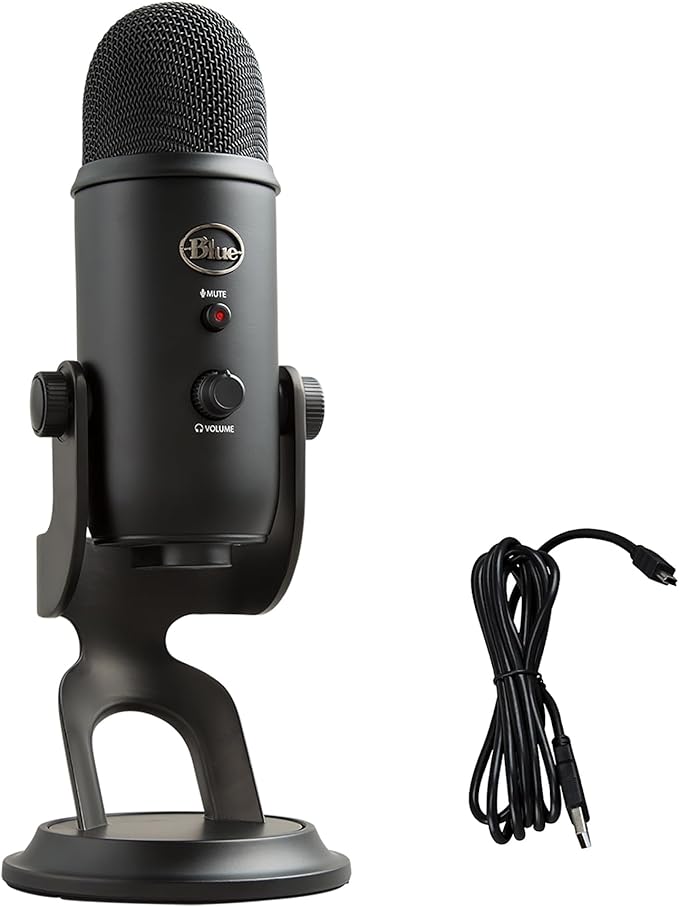
Blue Yeti USB Microphone — Blackout Edition
The more AI enters your workflow, the more your voice does too — dictating prompts, recording meetings for transcription, sending async Loom updates instead of scheduling calls. A quality microphone isn't a podcasting purchase anymore; it's a productivity tool. The Blue Yeti captures clean, clear audio in a home office environment without a complex setup, so your AI transcriptions are accurate, your async messages land professionally, and you stop sounding like you're calling from a parking garage. Plug-and-play USB, no interface required.
As an Amazon Associate, we earn from qualifying purchases. This helps support our blog at no extra cost to you.
 Trusted marketplace
The Honest Summary
AI tools are not going to transform your workday overnight.
They're also not going away, and the remote workers who figure out where they actually fit — not where the marketing says they fit — are going to have a quieter, less cognitively exhausting day than the ones who either ignore them entirely or try to use them for everything.
The use cases in this post are not flashy.
Standup notes. PR descriptions. Meeting summaries. Dreaded first drafts.
But these are the tasks that accumulate silently in a remote workday — the small cognitive taxes that don't feel significant individually and add up to an hour of low-value overhead every single day.
That's five hours a week.
Two hundred and fifty hours a year.
You don't need to believe AI is going to change everything to find that worth paying attention to.