The Automated Boundary: Using Smart Home Tech to Gate Your Office
Stop being the bad guy. Learn how to use smart home tech — motion sensors, smart lights, and voice assistants — to automate boundaries and protect focus time while working from home.
The Real WFH Conflict
Most WFH problems aren’t about time management.
They’re about boundary enforcement.
You don’t struggle because your kids don’t understand. You struggle because you’re the one enforcing the rule.
You have to:
- Say no.
- Ignore knocks.
- Reject interruptions.
- Re-explain the same boundary.
- Absorb the emotional friction.
All day.
This turns you into:
- The gatekeeper
- The bad guy
- The emotionally exhausted parent
The solution isn’t better discipline.
It’s automation.
The Automated Boundary Concept
The Automated Boundary is simple:
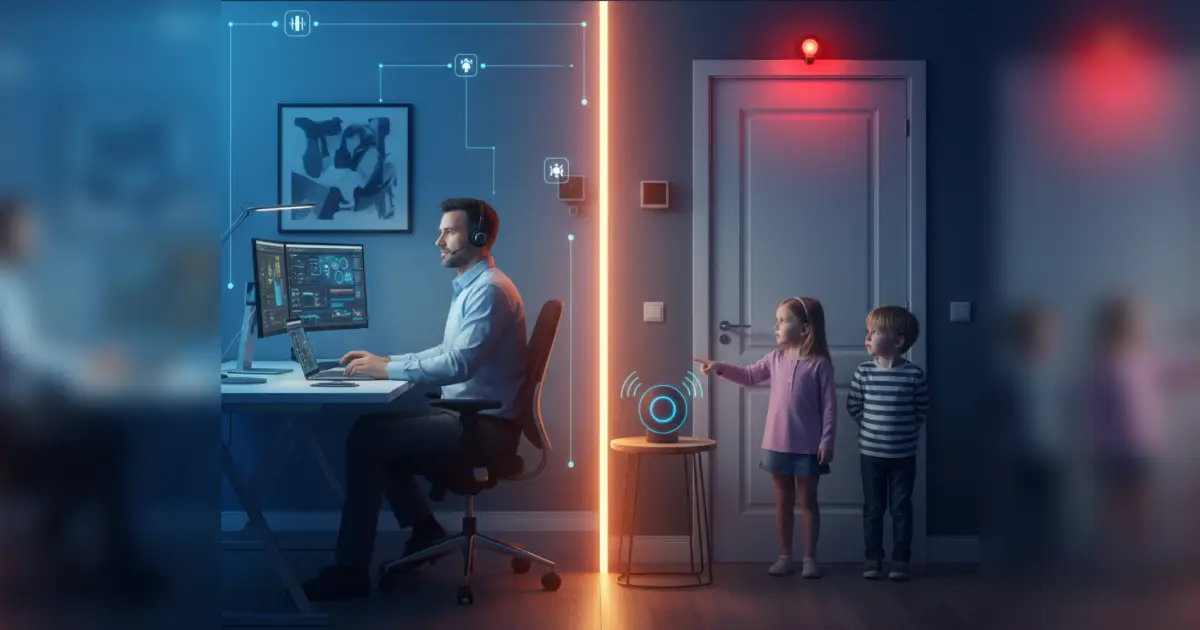
Let the house enforce the rule so you don’t have to.
Instead of: “Daddy is busy right now.”
The system says: “Office is in Do Not Disturb mode.”
Now the conflict isn’t: Parent vs child.
It’s: Child vs system.
Which is psychologically easier for everyone.
Why Automation Works (Psychology, Not Tech)
Automation removes:
- Emotional negotiation
- Repeated explanations
- Parental guilt
- Power struggles
- Inconsistent enforcement
And replaces them with:
- Predictability
- Neutral authority
- Visual signals
- Clear rules
- Reduced stress
Kids accept systems far better than moods.
The Three Layers of the Automated Boundary
You only need three things:
- Light
- Motion
- Voice
Together, they create a smart perimeter around your office.
Layer 1: The Traffic Light System (Smart Bulbs)
This is the core mechanic.
One smart bulb outside your office door:
- 🔴 Red = Do Not Disturb
- 🟡 Yellow = Knock only if important
- 🟢 Green = Safe to enter
This works because:
- It’s visual
- It’s simple
- It’s consistent
- Even toddlers understand it
No explanations needed.
Just color.
Layer 2: Motion Sensors (Passive Enforcement)
Now make it smarter.
Add a motion sensor in the hallway near your office.
When motion is detected and:
- The light is red
- And it’s work hours
The system can:
- Flash the red light
- Play a reminder sound
- Trigger a voice message
Now the house actively responds to boundary violations.
Not you.
Layer 3: AI Voice Assistants (The Neutral Authority)
This is where it becomes magical.
Use Alexa / Google / Siri to say:
“The office is in focus mode. Please check back at 4:00.”
It feels:
- Official
- Impersonal
- Non-emotional
And that’s exactly why it works.
You didn’t say no.
The system did.
The Full Automated Boundary Flow
Example setup:
When you say:
“Alexa, start focus mode.”
The system:
- Turns office light to red
- Arms motion sensor
- Blocks notifications
- Enables voice responses
When someone approaches:
- Motion detected
- Light flashes red
- Alexa says: “The office is busy. Please wait.”
When focus ends:
“Alexa, end focus mode.”
Everything resets.
You never spoke to a child once.
Recommended Tool: Smart Bulbs + Motion Sensor Starter Kit
You don’t need a full smart home.
Just:
- One smart bulb
- One motion sensor
- One voice assistant
That’s enough to build a boundary system.

Philips Hue Smart Bulb Starter Kit
Philips Hue smart bulbs make it easy to create a visual 'Do Not Disturb' system outside your office. Use the traffic light method (Red = Busy, Yellow = Interrupt Only if Urgent, Green = Free) so even young kids can understand your work boundaries at a glance.
As an Amazon Associate, we earn from qualifying purchases. This helps support our blog at no extra cost to you.
 Trusted marketplace
Philips Hue Motion Sensor
The Philips Hue Motion Sensor adds passive enforcement to your office boundary system. When paired with smart bulbs and a voice assistant, it can trigger lights or announcements whenever someone approaches your workspace during focus mode.
As an Amazon Associate, we earn from qualifying purchases. This helps support our blog at no extra cost to you.
Trusted marketplaceAdvanced Mode: AI-Level Office Gating
If you want to go full nerd:
You can automate based on:
- Calendar status
- Zoom meeting detection
- Keyboard activity
- Time of day
Example:
- When Zoom starts → Red light
- When meeting ends → Yellow
- After 5pm → Green
Your house becomes: A dynamic boundary engine.
The Emotional ROI
This system does something subtle but profound:
It removes you from the conflict loop.
You stop being:
- The enforcer
- The denier
- The bad guy
And become:
- The designer
- The system builder
- The calm parent
Your kids still respect the rule. But they don’t emotionally associate it with you.
Which preserves:
- Connection
- Trust
- Energy
- Sanity
The Real Win
The Automated Boundary isn’t about tech.
It’s about protecting your nervous system.
Every interruption costs:
- Focus
- Emotional regulation
- Cognitive momentum
When the house enforces the rule: You keep your attention. Your kids keep their dignity. And nobody has to fight.
You don’t need stronger willpower.
You need better systems.
And the best systems remove the human from the loop.