The Emergency Backup Plan Every WFH Parent Needs (Before 8am Chaos Strikes)
When childcare falls through or your kid gets sick, you need a plan. Here's how to build backup systems that keep both your job and your sanity intact.
Why WFH Parents Need an Emergency Protocol
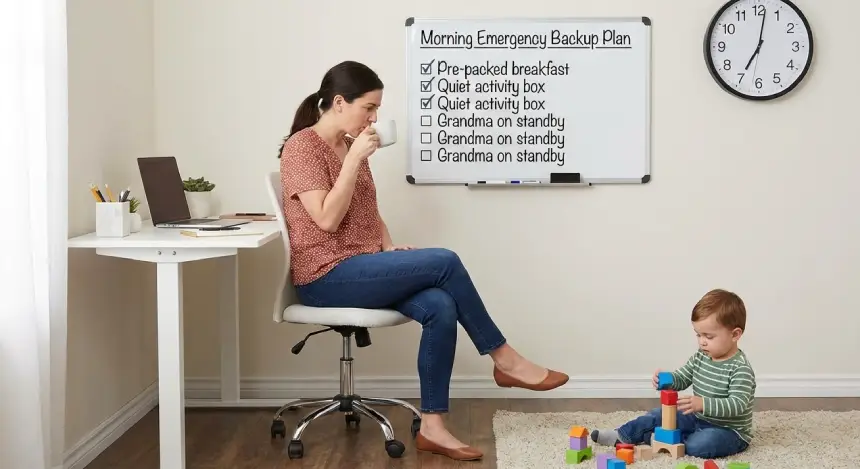
It's 7:45am. Your babysitter just texted she's sick. You have a critical sprint planning meeting at 9am. Your toddler is already demanding breakfast. This isn't a hypothetical—it's Tuesday.
The difference between WFH parents who thrive and those who barely survive isn't that the thriving ones have fewer emergencies. They just have better backup plans.
The 4-Tier Emergency System
Tier 1: The Morning-Of Scramble (0-2 hours notice)
When it happens: Childcare cancels, kid wakes up sick, unexpected school closure
Your immediate action plan:
- Send the SOS message (template below)
- Activate screen time protocols without guilt
- Deploy the emergency activity bin
- Reschedule what you can, delegate what you must
The SOS Message Template:
Team: Dealing with an unexpected childcare situation this morning.
I can join [Meeting X] via phone/no video and will need to step away
if needed. [Deliverable Y] will be ready by EOD as planned. Will keep
you updated.
Why this works: You're being transparent without over-explaining. Your team gets what they need to know, nothing more.
Tier 2: The Day-Before Alert (12-24 hours notice)
When it happens: Kid's running a low fever, weather forecast looks bad, you sense something's off
Your action plan:
- Prep your work for single-hand mode (more on this below)
- Brief your partner on tomorrow's critical meetings
- Set up the backup workspace (bedroom, dining table, wherever is quietest)
- Prepare the sick-day supply kit
Single-hand mode prep:
- Move tomorrow's priorities to today if possible
- Record any presentations in advance
- Set up async updates instead of live meetings
- Prep simple tasks you can do while holding a kid
Tier 3: The Week-Ahead Planning (Weekly prep)
Every Sunday evening, spend 10 minutes on:
- Review next week's calendar for "cannot miss" items
- Identify backup caregivers for each day
- Stack your week strategically (deep work early in week, flexible stuff Friday)
- Update your emergency contact list
The Emergency Contact List:
- Neighbor who works from home (for 30-min coverage)
- Retired grandparent or family friend
- Fellow WFH parent for swaps
- Drop-in daycare options in your area
- Teenage babysitter available for after-school emergencies
Tier 4: The Long-Game Infrastructure (Build once, use forever)
Set up these systems when things are calm:
The Backup Caregiver Network:
- Cultivate 2-3 emergency contacts who can help on short notice
- Offer to reciprocate when they need backup
- Keep a running list of their availability patterns
The Emergency Activity Bin: Fill a bin with NEW toys, activities, or supplies your kids have never seen:
- Sticker books
- Play-Doh
- Simple craft kits
- Special snacks
- New coloring books
Only open during emergencies. The novelty buys you precious focused time.
The Sick-Day Supply Kit: Keep stocked in one location:
- Children's medicine (fever reducer, pain reliever)
- Thermometer
- Popsicles and bland foods
- Extra screen time favorites downloaded offline
- Comfort items (special blanket, favorite stuffed animal)
The Work-Triage Framework
When an emergency hits, you need to quickly categorize your work. Use this system:
Critical (Cannot be moved):
- Client-facing meetings
- Production deployments
- Hard deadlines with external dependencies
Important (Can be rescheduled with notice):
- Internal team meetings
- Code reviews
- Planning sessions
Flexible (Can be async or delayed):
- Email responses
- Documentation
- Non-urgent slack messages
On emergency days, protect the Critical, reschedule the Important, and let the Flexible slide.
Managing Guilt and Expectations
Here's the truth: Using your emergency backup plan isn't failing. It's being a responsible professional AND parent.
What to tell yourself:
- "I'm handling an unpredictable situation with a solid plan"
- "My team benefits from my transparency and communication"
- "Taking care of my sick kid is part of being a reliable human"
What to tell your team:
- Be matter-of-fact, not apologetic
- Focus on what you CAN do, not what you can't
- Update once, then get back to work
What NOT to say:
- "I'm so sorry, I'm such a mess"
- Long explanations about your childcare situation
- Promises you can't keep to compensate
The Partner Coordination System
If you have a co-parent, you need a shared emergency protocol:
The Daily Check-In (60 seconds each morning):
- Who has the more critical workday?
- What's the backup plan if childcare fails?
- Who's on kid duty for which time blocks?
The Emergency Code Words:
- "Code Red" = I have something absolutely unmovable, you need to take point
- "Code Yellow" = I can flex if needed
- "Code Green" = My day is relatively open
Real Talk: Screen Time During Emergencies
On emergency days, screen time limits go out the window. That's the whole point of emergency protocols—they're different from normal days.
Make peace with:
- Extended tablet time
- Back-to-back movies
- Educational apps you'd normally limit
Set boundaries:
- Emergency screen time is for emergencies, not daily use
- Return to normal limits the next day
- Don't shame yourself or your kids for using this tool
Testing Your Emergency Plan
Don't wait for a real emergency to find out your plan doesn't work.
Do a drill:
- Pick a regular workday
- Pretend childcare just fell through
- Execute your emergency protocol
- Note what worked and what didn't
- Adjust accordingly
Recovery Mode: The Day After
After an emergency day, you need a recovery protocol:
Immediate (that evening):
- Reset the emergency activity bin
- Restock the sick-day supply kit
- Send brief updates to anyone affected
- Let yourself decompress
Next day:
- Return to normal routines
- Catch up on urgent items
- Thank anyone who helped
- Update your emergency plan based on what you learned
Recommended Tools

Melissa & Doug Reusable Sticker Pad Bundle
Perfect for your emergency activity bin. These reusable sticker pads can keep kids engaged for 30-60 minutes of focused work time. Store them sealed until you need them—the novelty factor is crucial.
As an Amazon Associate, we earn from qualifying purchases. This helps support our blog at no extra cost to you.
 Trusted marketplace
Your Action Items This Week
- Create your SOS message template and save it in a note
- Build your emergency contact list with actual phone numbers
- Assemble your emergency activity bin this weekend
- Schedule your Sunday planning session
- Have the partner coordination conversation
The Bottom Line
You can't prevent emergencies, but you can prepare for them. The time you spend building these systems now will pay off exponentially the first time childcare falls through or your kid spikes a fever.
The goal isn't to have a perfect backup plan. It's to have a good enough plan that you can execute under pressure without losing your mind or your job.
And remember: Every WFH parent faces these situations. The ones who seem to handle it gracefully? They just planned ahead.